
Check the input, then compare the complete deliverables
Explore the original materials, item-by-item outcomes and full report below. Attempt the input independently before using the reference to find omissions or disagreements.
This practice uses 8 synthetic posts. A separate historical X test contains 10 AI summaries, not verbatim posts; that execution included unauthorized delegation and cannot be described as strict compliance.
Original synthetic material. Try the input independently, then compare the reference results.
Original synthetic input
{
  "synthetic": true,
  "case": "x-personal-portrait-site",
  "data": {
    "source": [
      {
        "id": "demo-01",
        "date": "2026-10-01",
        "text": "I split weekly material organization into three small steps: collect links, archive them on Friday, then write one conclusion of my own.",
        "url": ""
      },
      {
        "id": "demo-02",
        "date": "2026-10-03",
        "text": "I tried a new tool. I care more about removing repeated work than the number of buttons on its homepage.",
        "url": ""
      },
      {
        "id": "demo-03",
        "date": "2026-10-05",
        "text": "My reading notes keep three things: the author’s question, an example that changed my view, and a small experiment for next week.",
        "url": ""
      },
      {
        "id": "demo-04",
        "date": "2026-10-07",
        "text": "When demonstrating automation to a friend, I ask them to complete a manual run before giving the most repetitive step to a tool.",
        "url": ""
      },
      {
        "id": "demo-05",
        "date": "2026-10-09",
        "text": "A reminder: start email organization with draft text only. Add permissions gradually after classifications become consistent.",
        "url": ""
      },
      {
        "id": "demo-06",
        "date": "2026-10-11",
        "text": "Sunday review: I removed two dashboards I no longer opened and kept one list that tells me what to do next.",
        "url": ""
      },
      {
        "id": "demo-07",
        "date": "2026-10-13",
        "text": "For a personal homepage, start by explaining what you have done, why, and where people can learn about you. Animation can wait.",
        "url": ""
      },
      {
        "id": "demo-08",
        "date": "2026-10-15",
        "text": "I documented a small project: inputs, how to run it and how to check results. Reproducibility matters more than a pretty screenshot.",
        "url": ""
      }
    ],
    "requested_themes": "2–4 supported themes; no personality scoring"
  }
}
Processing rules
Retain synthetic text verbatim; URLs stay empty. Describe only this sample with actual evidence ids. Do not infer income, health, occupation or a complete personality. One Bot performs stages sequentially; no unapproved subagents, contact with other Bots or deployment.
Complete reference results under this tutorial’s rules; nothing was written to a third-party service.Scroll horizontally within the table if needed.
| Theme | Observation | Evidence ids | Boundary |
|---|---|---|---|
| C01 | Information into action lists | demo-01 / 03 / 06 | Describes this sample only |
| C02 | Validate before automation | demo-02 / 04 / 05 | No real efficiency claim |
| C03 | Clarity and reproducibility | demo-07 / 08 | No personality score |
The existing static demo retains source text and evidence links. Historical screenshots below belong to a separate X test.
The 10 items are AI summaries. Unauthorized internal delegation occurred; the audit and verification limits remain visible.
Portrait page delivery — synthetic exercise
Input: 8 synthetic posts; URLs empty.
Themes: C01 action lists, C02 validation before automation, C03 clarity/reproducibility.
Evidence: existing demo ids only; no personality, income or health inference.
Chain: source-data.json → claims.json → site-brief.md → standalone HTML → checks.
Existing synthetic demo: /demos/portrait/result.html.
Historical real test: /demos/portrait-real/result.html; 10 AI summaries. See retained audit for constraint violations and verification limits. Not a new run.
No deployment.
Historical X test: retained screenshots and execution limits
The historical test on October 16, 2026 used 10 AI summaries from LanGe AI’s public account, covering October 14–16. This is a third-party sample observation, not the author’s own homepage or a complete 30-day record. The retained evidence pages and screenshots are in Chinese.
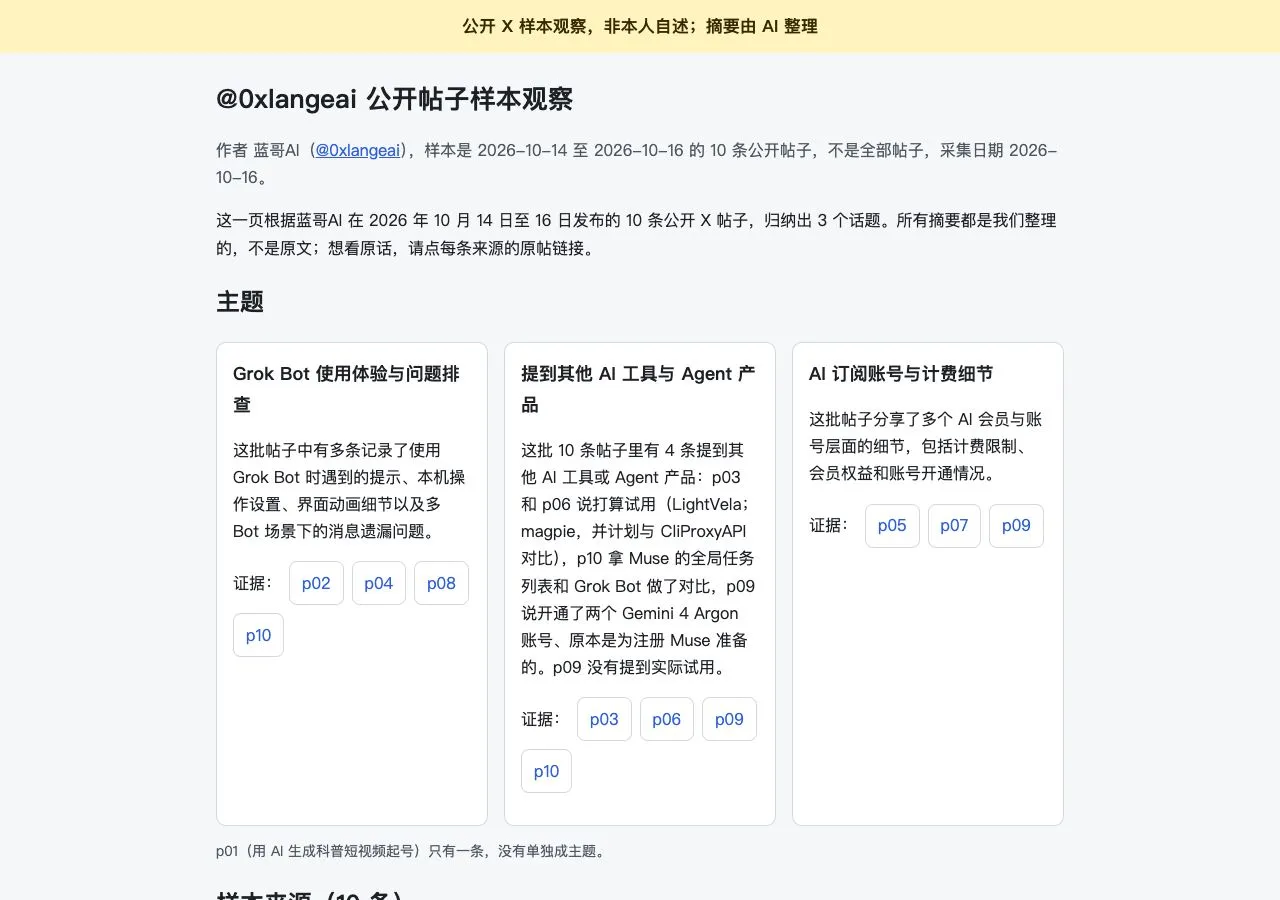
View the retained 375px mobile screenshot

Historical correction:The execution record contains unauthorized internal delegation and did not fully obey the no-subagent requirement. That limitation is retained. Site checks and remote execution evidence are assessed separately. No subagents were opened in this round.
Prepare the materials and check your tools
Start with the practice files
- Download eight posts and rules before deriving themes.
- Check id/date/text/url; synthetic URLs remain empty.
- Keep historical evidence and limitations separate from this exercise.
Before using real services
- Confirm real account, dates, limit and available reading method.
- If originals are unavailable, supply a CSV and distinguish summaries from original text.
- Use a single Bot unless delegation is explicitly approved.
Complete one file-based exercise first. For real services, verify the actual account, available tools and operation scope, then follow the acceptance check at each stage.
Download the original input and rules ↓Execution and takeover boundaries
The actions below require the agreed inputs, accounts and scope. Configuring a Routine does not expand that authorization.
Can run automatically
Build a theme evidence map, design and local static page from supplied verifiable posts, using one Bot sequentially.
Requires confirmation
Confirm expanded collection, contacting other Bots, creating subagents, exposing personal material, pushes and deployment separately.
Take over after a failure
Stop at the current stage after missing evidence, unsupported claims or execution violations. Hand over inputs, files and records for human correction without inventing traces.
Check identity, dates and material type
Original text, summaries and synthetic posts support different levels of observation. Never label a summary as a verbatim post.
Read source-data.json only. Check 8 unique ids, dates, empty text and URLs; preserve wording. Synthetic URLs must be empty. Save intake.md; do not read X, delegate or build a page yet.An eight-item intake report.
No fabricated X link or real-person attribution for synthetic text.
Connect themes to evidence
Keep a narrow observation or remove a weak theme. A page should show what the sample says, not guess someone’s personality.
Create 2–4 themes with id, title, observation and evidence array. Cite existing demo ids only. Infer no occupation, income or health and give no percentage scores. Deliver claims.json.A supported theme table.
Every evidence id exists; no claim is stronger than its sources.
Agree content order and mobile layout
Specify themes, evidence entry points and a source section before visual polish. The synthetic label must be visible immediately.
Write site-brief.md from reviewed claims: introduction, theme order, evidence ids, source area and a single-column 375px layout. Label synthetic data; add no name, contact details or achievements. Deliver design notes only.An implementable content/layout brief.
Each card links to evidence; the synthetic label is visible near the top.
Generate a standalone static page
Native HTML/CSS and system fonts make output easier to open. Report the actual output path from the execution environment.
Read input, claims and brief; generate standalone index.html with no external scripts, fonts or images and no dependencies. Use real same-page ids and retain all source text. One Bot works sequentially; do not delegate, deploy or send messages.A standalone HTML file and its actual path.
Themes match sources and no evidence target is invented.
Check actual desktop, mobile and evidence links
Static inspection and a browser run are different evidence. Record real viewports and results; a design mockup is not an execution screenshot.
Open the delivered page in an available browser. Check desktop and 375px: all evidence links, unchanged text, no invented facts or whole-page horizontal overflow. Return actual screenshots and checks. If unable to open, mark browser checks unverified; do not simulate screenshots.Actual screenshots and a checklist.
Evidence comes from the real page and states untested areas.
Revise evidence before updating the page
A withdrawn claim must update claims, brief and HTML together. Retain the reason without inventing sources to rescue it.
For <theme id/revision reason>, update claims, then brief and HTML. Preserve the prior version and change notes; recheck evidence and mobile layout. Confirm scope separately for real inputs. Do not inherit sample conclusions, deploy or delegate.A consistent revision and recheck.
All deliverables agree; no invented posts or hidden historical limits.
Find the evidence before choosing the next action
Can summaries support a portrait?
They can support sample-theme observations if labeled as summaries, not verbatim posts or a complete personality.
A theme has too little evidence
Remove or narrow it rather than inventing sources.
The page looks good but evidence links break
Fix id mapping and links before visual refinements.
Did the historical test obey every constraint?
No. The retained correction records unauthorized internal delegation; that limit remains explicit.
Check every item before finishing
These page-local checkboxes reset on refresh. Checking them does not verify a real service connection.
Checked 0 / 6 items
Download the inputs separately from the reference answers
Start with input and rules without showing the reference answers. After acceptance, save the report and complete prompt set.
source-data.json↓Rules and scopeDefinitions, exceptions and delivery requirements.workflow-rules.md↓Item-by-item reference resultsCompare every input with its outcome.expected-results.csv↓Complete reference reportResults, evidence and missing information.reference-report.md↓All stage prompts6 instructions with expected outputs and acceptance checks.practice-prompts.txt↓Reference themes and evidenceThree themes with actual synthetic ids.claims.json↓Reference page briefContent order and synthetic labeling.site-brief.md↓Check documented capabilities and exercise results separately
Content updated: · Editing a page does not reverify its sources or live workflow.
Documentation review: Historical review record ·
Preserves the Chinese portrait tutorial’s last_checked record for its listed sources and demonstration scope. External sources were not reread in this edit; the English edition was not separately verified.
Live workflow verification: Partial verification · includes failed checks ·
Historical partial verification only: records cover 10 real X inputs, theme evidence and local page checks. Internal traces are incomplete and the no-subagent constraint was violated; process compliance failed, so this is not a full workflow pass.
Execution verification record ↗Process audit and failed checks ↗
This practice uses 8 synthetic posts. A separate historical X test contains 10 AI summaries, not verbatim posts; that execution included unauthorized delegation and cannot be described as strict compliance.
No new X collection or remote Bot run was performed. The historical sample covers October 14–16, not a complete 30 days. Images, videos and all original posts were not individually verified.
- LanGe AI: original inspiration on X ↗
Original author attribution is retained. The tutorial and synthetic practice materials were independently written by shancha.
- Grok Bot: files and results ↗
Check uploaded inputs, actual output paths and delivered files.
- Grok Bot: apps and the shared computer ↗
Check connected accounts, available tools, visibility and user takeover.
- Grok Bot: Skills and Routines ↗
Validate a manual run before saving a method or scheduling it.
Try another small batch of your own material
Retain original input and operation records. Verify that each result can be traced before adding connections or recurring runs.